Website Not Generating Leads? 10 Common Reasons and How to Fix Them
Traffic but no inquiries? Diagnose the five places websites leak leads and fix the ten most common problems.
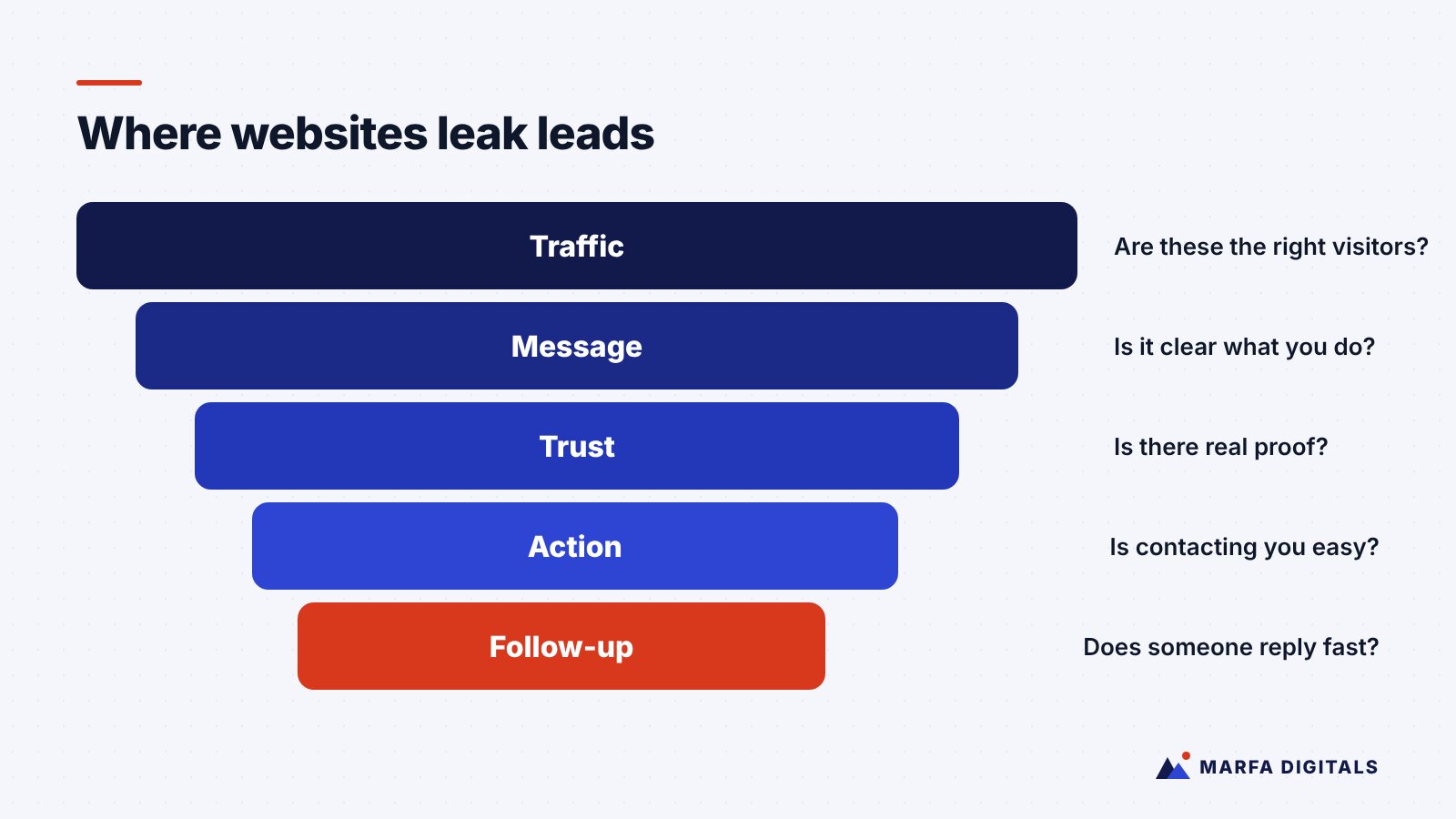
When a website gets traffic but few leads, the cause is usually one of five things: the wrong visitors, an unclear message, missing trust signals, too much friction in the contact process, or slow follow-up after someone reaches out. Diagnose in that order. Check where your traffic comes from, then whether your pages clearly say what you do and for whom, then whether visitors have a reason to believe you, then how easy it is to contact you, and finally how fast your team responds.
Many business owners invest in a new website, launch it, and wait for the phone to ring. When it does not, the instinct is to buy more traffic. That rarely fixes the problem. If a website is not converting the visitors it already gets, more visitors usually means more wasted spend.
Below are ten common reasons a website fails to generate leads, how to spot each one, and what to do about it.
First, Confirm the Problem
Before changing anything, make sure you are measuring correctly. Check that:
- Form submissions are tracked as conversions in Google Analytics 4.
- Phone calls from the website are tracked, ideally with call tracking numbers.
- Your contact form actually works and sends notifications to someone who checks them.
It sounds obvious, but broken forms and notifications going to an old email address are more common than most owners expect. Submit a test lead from your phone right now and confirm it arrives.
10 Reasons Your Website Isn’t Generating Leads
1. You are attracting the wrong visitors
Signs: Lots of traffic from blog posts unrelated to your services, visitors from outside your service area, or paid clicks on broad search terms.
Fix: Review your traffic sources in GA4 and the search terms in your ad accounts. Focus SEO and ads on searches that show buying intent, such as “commercial roof replacement Dallas” or “HubSpot implementation partner,” not just informational topics.
2. Visitors cannot tell what you do in five seconds
Signs: A homepage headline like “Excellence in Every Detail” or “Innovative Solutions for Tomorrow.”
Fix: Your headline should state what you do, who it is for, and ideally where. “Commercial HVAC installation and maintenance for Houston businesses” beats a slogan every time. Support it with a short line about the outcome customers get.
3. There is no clear next step
Signs: Calls to action buried at the bottom of the page, several competing buttons, or vague labels like “Submit.”
Fix: Choose one primary action per page, such as “Get a Free Quote” or “Book a Demo,” and repeat it at logical points. Keep a secondary option for people not ready to commit, such as a pricing guide or a phone number for local service businesses.
4. Your forms ask for too much
Signs: Long forms with required fields for budget, company size, timeline, and how they heard about you.
Fix: Ask only for what you need to respond. For many businesses, that is name, email or phone, and a short description of the need. You can qualify further on the first call or with a follow-up form.
5. The site is slow, especially on mobile
Signs: Large images, heavy page builders, many plugins, and slow load times on a phone.
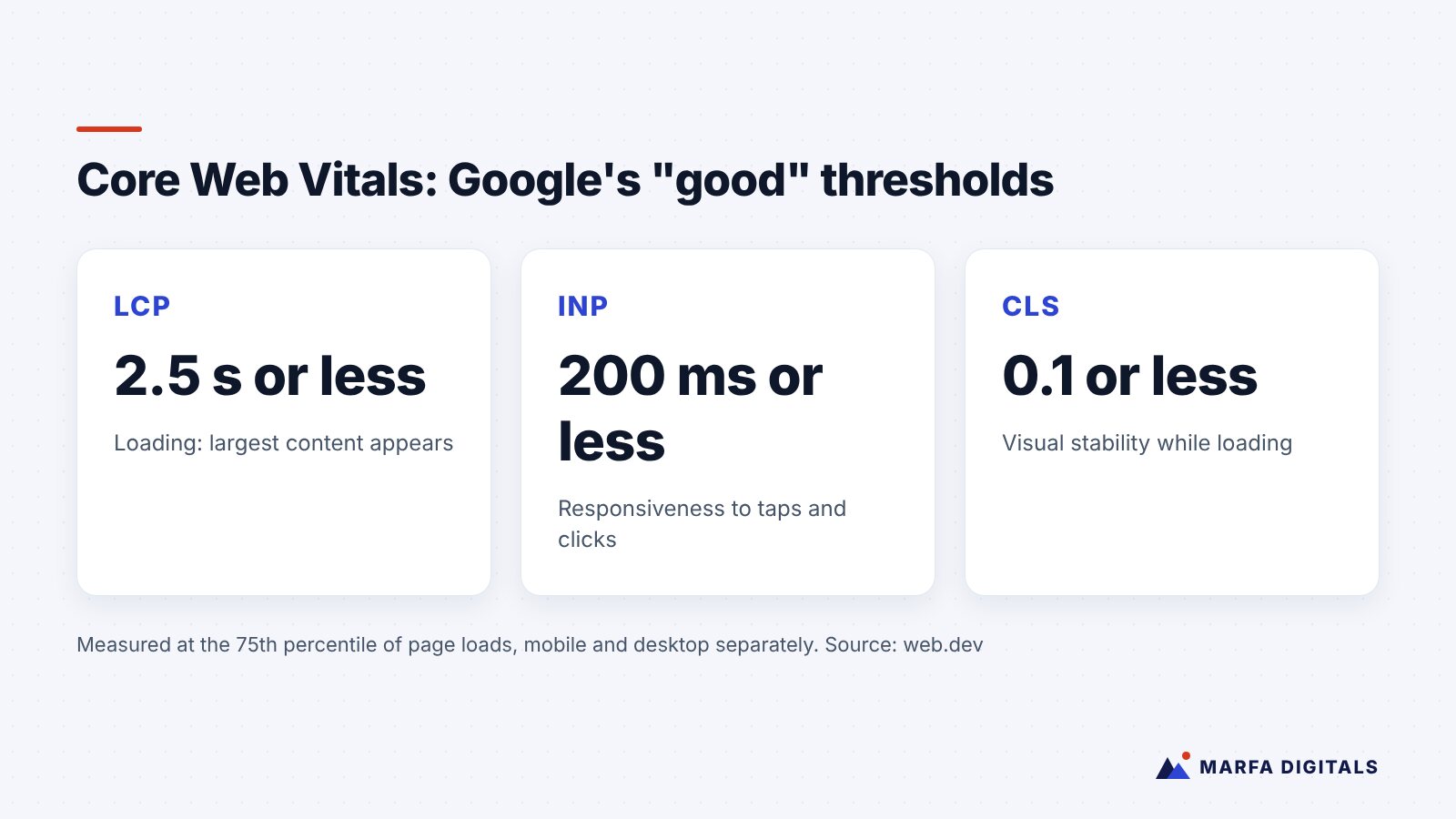
Fix: Test key pages with Google’s PageSpeed Insights. Google’s Core Web Vitals define good thresholds as Largest Contentful Paint of 2.5 seconds or less, Interaction to Next Paint of 200 milliseconds or less, and Cumulative Layout Shift of 0.1 or less, measured at the 75th percentile of visits. Compress images, remove unused plugins, and fix layout shifts caused by late-loading elements.
6. There is no proof that you are good at what you do
Signs: No reviews, case studies, client logos, certifications, or photos of real work.
Fix: Add verifiable proof near your calls to action: reviews from Google or industry platforms, short case studies with real results, project photos, licenses, and recognizable clients if you have permission to show them. Never invent testimonials.
7. Service pages are thin or combined into one
Signs: A single “Services” page listing everything you offer in a few bullet points.
Fix: Create a dedicated page for each core service. Explain the problem it solves, how your process works, what affects pricing, typical timelines, and answers to common questions. These pages convert better and rank better because they match what people search for.
8. You are not answering the pricing question
Signs: Visitors leave from service pages and your team keeps hearing “How much does it cost?” on calls.
Fix: You do not need a price list, but you can explain what drives cost, share typical ranges where appropriate, or describe packages. Buyers who understand the investment are more likely to contact you and less likely to waste your time.
9. Mobile visitors struggle to take action
Signs: Tiny buttons, phone numbers that are not tappable, pop-ups covering the screen, or forms that are painful to fill out on a phone.
Fix: Test your site on your own phone as if you were a customer. Use tap-to-call links, large buttons, and a sticky call or quote button for service businesses.
10. Leads arrive but nobody follows up fast enough
Signs: The website “doesn’t work,” but your inbox has inquiries that waited hours or days for a reply.
Fix: Set up instant confirmation emails or texts, route leads to the right person, and create a simple follow-up sequence. For calls you cannot answer, an automated text-back can save the lead. Our guide to missed call text back explains how it works. Our AI and automation services can handle routing and follow-up.
How to Prioritize Fixes
| Fix | Effort | Typical impact |
|---|---|---|
| Test and repair forms and notifications | Low | Can be immediate if something was broken |
| Rewrite homepage headline and calls to action | Low | High |
| Shorten forms | Low | Medium to high |
| Add proof near calls to action | Low to medium | High |
| Instant lead follow-up | Medium | High |
| Improve page speed | Medium | Medium to high |
| Build dedicated service pages | Medium to high | High, for both conversions and SEO |
Start with the low-effort fixes. They often reveal how much of the problem was simple friction rather than a need for a full redesign.
When a Redesign Makes Sense
Sometimes the issues run deeper: the site is built on an outdated platform, cannot be edited without a developer, or fails on mobile across the board. In those cases, a rebuild may be the better investment. If you go that route, plan carefully so you do not lose the search rankings you already have.
A focused landing page can also change results quickly. In a B2B IT services engagement featured in our case studies, a new landing page combined with LinkedIn, high-intent Google Search campaigns, and CRM automation produced 32 qualified leads per month.
Frequently Asked Questions
What is a good website conversion rate?
It varies widely by industry, traffic source, and what you count as a conversion, so be cautious with generic benchmarks. The most useful comparison is your own site over time, and your paid traffic against your organic traffic.
Should I add a chatbot to get more leads?
A chatbot can help capture visitors outside business hours or answer common questions, but it will not fix an unclear offer or a slow site. Fix the fundamentals first.
How long does it take to see results from conversion fixes?
Simple fixes such as repaired forms and clearer calls to action can show results as soon as you have enough traffic to measure. Larger changes need a few weeks of data.
Turn Your Website Into a Sales Tool
A good-looking website is not the same as one that generates business. If yours is getting visitors but not inquiries, our web development team builds and optimizes sites designed to convert. Request a free website review and we will show you where leads are slipping away.
Sources
- web.dev, Web Vitals
- Google, PageSpeed Insights