
Best CRM for Small Businesses in Texas: HubSpot vs GoHighLevel vs Zoho (2026)
A practical comparison of HubSpot, GoHighLevel and Zoho CRM for Texas small businesses — features, ease of use, costs and which to choose for your business.
For most Texas small businesses, the best CRM depends on how you sell. GoHighLevel suits local service businesses that want SMS, calendars, reviews and funnels in one place. HubSpot suits businesses with a sales process, email marketing and a growing team that values ease of use. Zoho CRM suits budget-conscious businesses that want flexibility and other Zoho apps. Choose the one your team will actually use daily and that connects to your lead sources.
Whether you run a roofing company in Lubbock, a dental practice in Sugar Land or an IT firm in Plano, a CRM is the backbone of modern lead follow-up and automation. But “best CRM” lists are usually written for big companies. Here’s a practical comparison for Texas small business owners.
HubSpot vs GoHighLevel vs Zoho at a Glance
| Factor | HubSpot | GoHighLevel | Zoho CRM |
|---|---|---|---|
| Best for | Sales teams, B2B, content and email marketing | Local service businesses and agencies | Budget-conscious teams wanting flexibility |
| Ease of use | Very easy | Moderate — powerful but busy | Moderate |
| Built-in SMS & calling | Available, often via add-ons/integrations | Yes, core feature | Via integrations and add-ons |
| Calendars & booking | Yes | Yes | Yes (with Zoho Bookings) |
| Review requests | Via integrations | Built in | Via integrations |
| Starting cost | Free tier; paid plans scale with seats and features | Flat monthly plans plus usage fees | Free edition for small teams; low-cost paid plans |
Pricing changes often, so check each vendor directly: HubSpot, GoHighLevel and Zoho CRM.
When to Choose Each CRM
Choose GoHighLevel if…
- You’re a home service, med spa, dental, fitness or other local business.
- Texting, missed call text back, booking and review requests are your priorities.
- You want one tool instead of five — and you’re OK with a learning curve (or help setting it up).
Choose HubSpot if…
- You have a sales team, longer sales cycles or B2B deals.
- Email marketing, content and reporting matter a lot.
- Ease of use and adoption are your biggest concerns.
Choose Zoho CRM if…
- You want low costs and lots of customization.
- You already use (or want) Zoho Books, Desk or other Zoho apps.
- You have someone comfortable configuring software.
Questions to Ask Before You Buy
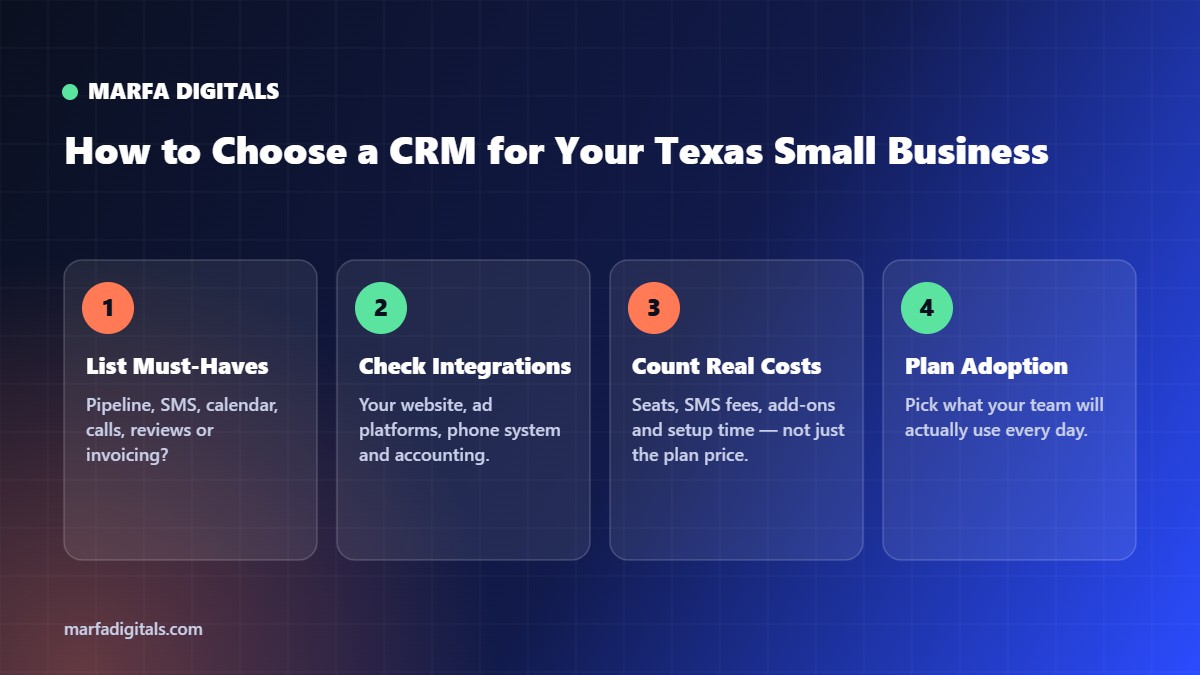
- Where do our leads come from, and does this CRM connect to all of them?
- Do we need two-way texting, and in which languages?
- Who will own the system day to day?
- What will it really cost with seats, SMS, phone numbers and add-ons?
- Can it send data back to Google Ads and Meta? (See CRM integration.)
The CRM Is Only Half the Job
A CRM without automation is just a contact list. The value comes from instant lead follow-up, workflow automation and an AI chatbot feeding it new leads. For examples, read 7 marketing automation workflows and CRM automation in San Antonio. See all guides in the Texas AI automation guide.
Not sure which CRM fits your business?
We help Texas small businesses choose, set up and automate the right CRM — without overpaying for features you will not use. See our CRM automation services.
Get a Free CRM Recommendation →Frequently Asked Questions
What is the best CRM for a small service business in Texas?
For local service businesses that rely on texting, booking and reviews, GoHighLevel is often a strong fit. HubSpot is easier for sales-focused teams, and Zoho is a flexible budget option.
Is HubSpot free for small businesses?
HubSpot offers a free CRM tier with core features. Paid plans add automation, more seats and advanced tools; check current pricing on HubSpot.
Is GoHighLevel good for small businesses?
Yes, especially for local service businesses that want SMS, calendars, reviews and funnels in one platform, though it has a learning curve.
How do I choose between CRMs?
List your lead sources and must-have features, check integrations, calculate total cost including add-ons, and pick the system your team will actually use every day.
Related articles
 Marketing Automation & AI AI Chatbots for Small Business Websites: What They Can Do and How to Set One Up
Read article
Marketing Automation & AI AI Chatbots for Small Business Websites: What They Can Do and How to Set One Up
Read article
 Marketing Automation & AI Marketing Automation for Small Business: 7 Workflows to Set Up First
Read article
Marketing Automation & AI Marketing Automation for Small Business: 7 Workflows to Set Up First
Read article
 Marketing Automation & AI AI Receptionists for Small Businesses: Are They Worth It for Service Companies?
Read article
Marketing Automation & AI AI Receptionists for Small Businesses: Are They Worth It for Service Companies?
Read article